Monthly Archives: August 2009

Finally Indian Govt dept uses MicroStrategy

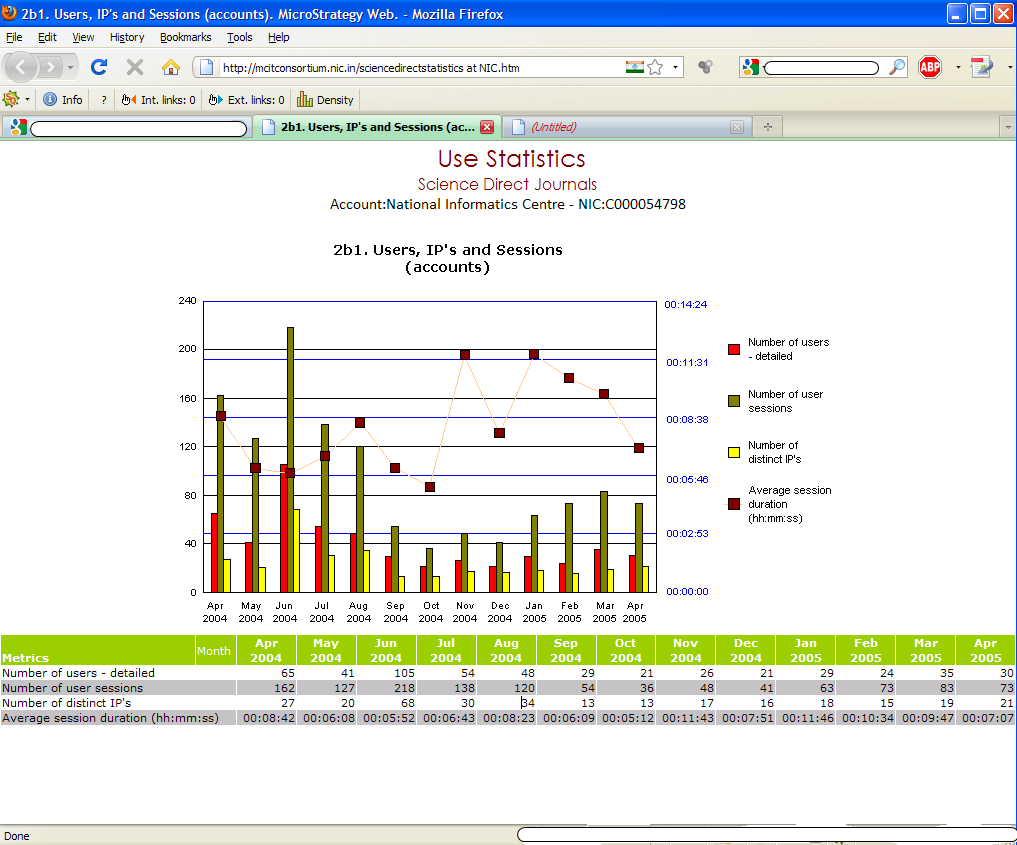
I was searching about the presence of MicroStrategy in India and I stumbled upon this page. Snaspshot of the page is as below:

Science Direct Library Service usage by NIC

Science Direct Library Service usage by NIC

After some browsing I also came to know how to browse to this page too. It is Home -> Statistic -> Y (for NIC).

Now look closely to the report, it is a MicroStrategy grid graph report. Grid auto-style is small. Grid look and feel is exactly like a MicroStrategy report. I really don’t know that’s a legal installation of MicroStrategy. The reports is of year 2006 and the site is never updated after that. Indian govt employees are like; they would sell the free stuff to Govt too (to corner tax payer’s money). Finally there is one more MicroStrategy client in India.

If you have any idea about this, do share.

Intelligence Server SDK startup kit – v2

In the first episode of this series I showed you how to connect to a MicroStrategy project using VB6. Time has come to look at three ways that can be employed to find an object.

Two of these methods (objSearch.Execute and ObjectSource.FindObject) are actually covered by Tech Notes on the Knowledge Base. Nevertheless, I thought to embed them in easy to use Functions.

The third method is the famous Search by ID, as I think is time for me to disclose its secrets… To be honest I never thought I would, but hey, it’s my 3 years within MicroStrategy community anniversary, so this one is on me :)

You can download the VB6 project files here:

Application(s) is provided “as is” and MicroStrategy101 and individual application author(s) disclaim all warranties, whether express or implied, with respect to all provided items, including all warranties of merchantability, fitness for a particular purpose, accuracy, systems integration, title, satisfactory quality and non-infringement. MicroStrategy101 and individual application author(s) do not warrant that use of the provided items or any portion thereof will be uninterrupted or error-free, or that the provided items or any portion thereof will meet any need or requirement of licensee.

MicroStrategy Object Exchanger

MicroStrategy Object Exchanger is a custom written tool that allows automatic and fast replacement of all occurrences of an attribute or a metric in all available reports. The formatting of the replaced object will be preserved!

Compared to the conventional manual way (open each report, replace the object, format the object again, save the report) Object Exchanger helps you to save many hours of hard and error-prone work.
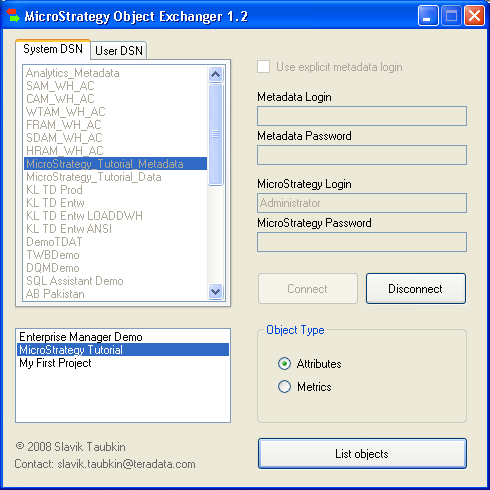
MicroStrategy Object Exchange

MicroStrategy Object Exchange

The tool is based on MicroStrategy Intelligence Server API. You will need .NET Framework Redistributable (from Version 2.0) to start the tool. You can download it for free from Microsoft.

I used this tool at one of the German retail customers to replace one of the attributes (Item) with another one (Item Group) — but in over 100 reports! The whole process took only about 2 minutes.

Feel free to use MicroStrategy Object Exchanger in your projects. You can download it here. Just unpack the ZIP-file. The interface is very intuitive. Please let me know about your experience using this tool.

Note: You must have MicroStrategy installed on the machine where you want to execute this tool.

The Object Exchanger currently only supports the metadata from 8.x versions. To be on the safe side don’t forget to backup your metadata! I look forward for your comment, views on this tool.

You can read more about MicroStrategy Object Exchanger at my blog in German language.

Application(s) is provided “as is” and MicroStrategy101 and individual application author(s) disclaim all warranties, whether express or implied, with respect to all provided items, including all warranties of merchantability, fitness for a particular purpose, accuracy, systems integration, title, satisfactory quality and non-infringement. MicroStrategy101 and individual application author(s) do not warrant that use of the provided items or any portion thereof will be uninterrupted or error-free, or that the provided items or any portion thereof will meet any need or requirement of licensee.
Calling a Stored Procedure from MicroStrategy

I alwasy wondered how one can do it. This is something that I had seen during my employment but as not involved, was not able to recall it. finally found how to do it. MicroStrategy kb search is very pathetic.

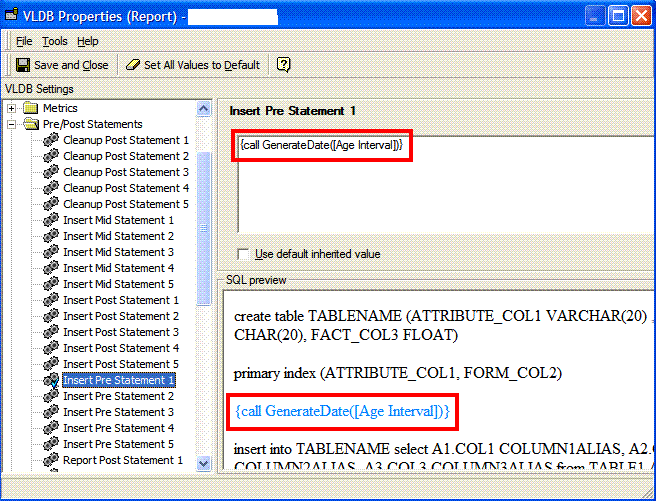
How to use it: Open VLDB Properties of the report and changed setting Pre/Post Statements based on your requirement.

Take an example: {call GenerateDate([Age Interval])}

Calling a stored precedure from MictoStrategy Report

Calling a stored precedure from MictoStrategy Report

{} curly brackets are required as per MicroStrategy.
MicroStrategy recommends using CALL statement instead of EXEC to execute/call a stored procedure.
[Age Interval] is a MicroStrategy numeric value prompt that can be passed as parameter to the stored procedure. This is optional.

Other things to do but not for all ODBC Drivers.

MicroStrategy ODBC Driver must be configured to accept results from stored procedures. As per tech-note I found only Oracle needs to do following.

UNIX: The following line must be added manually to the Data Source Name (DSN) definition in the ODBC.INI file
ProcedureRetResults=1
Windows: Open the DSN and see if there is some setting for Procedure Result. Select that.

This can be used to pass parameter to a stored procedure from MicroStrategy too. In cases where multiple values need to be passed from the same prompt, an element list prompt should be used.