Here is one of my recent interesting tasks:
Calculate some metrics only for the items that are in high demand. An item is “in high demand”, if its sales value were greater than the constant X in every of the last 5 months (including the current month).
Solution
First again setting of tasks:
An article A is valid in the month M as an article with large demand, if its Abverkäufe in everyone of the last 5 months (inclusive the current month) were larger a fixed constant X (e.g. was X = 100). We want to find and in a report represent as efficiently as possible all to such combination A and M (which we if necessary than a Metric filter to use later to be able).
Here my solution is using only one transformation. I see the advantage of this solution in the fact that only once the generally very large fact table one accesses.
For all examples I will use according to standard installed the project in my blog MicroStrategy Tutorial. Therefore you can my examples easily copy and try out. In addition it is possible to compare several solutions of a problem directly.
As I already betrayed, I use a transformation in my solution. Therefore a Transformations view must be defined as the first. The data source for the project „MicroStrategy Tutorial “is an ACCESS data base TUTORIAL_DATA_7200.mdb.
We put on the following View:
SELECT t1.MONTH_ID, t2.MONTH_ID AS PREV_MONTH_ID, DateDiff („m “, t2.MONTH_DATE, t1.MONTH_DATE) AS MONTH_DIFF
FROM LU_MONTH AS T1, LU_MONTH AS t2
WHERE (((DateDiff („m “, t2.MONTH_DATE, t1.MONTH_DATE)) Between 0 and 4))
ORDER BY t1.MONTH_ID, t2.MONTH_ID;
The VB-function DateDiff supplies here the number of full months, which lie between the handed over date values. The expenditure of the View looks then about in such a way:
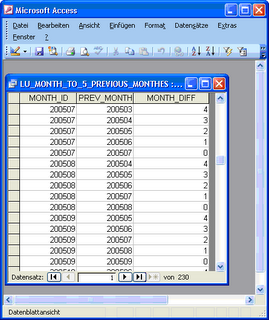
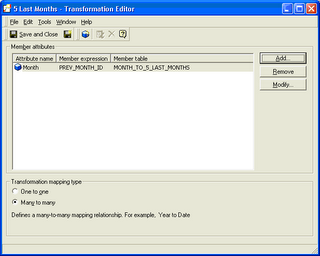
We designate the View „MONTH_TO_5_LAST_MONTHS “. Now the View in the Warehouse catalog is imported; subsequently, on the new logical table the following objects are defined:
Transformation “5 load Months “
Attribute “Months Diff “
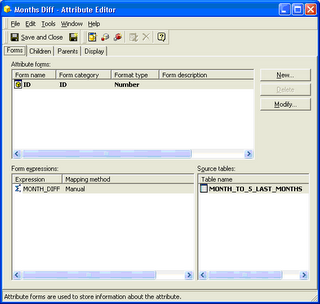
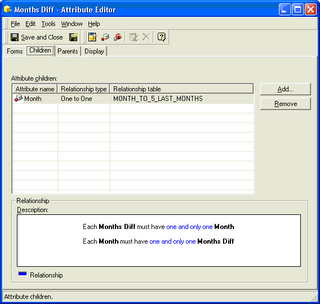
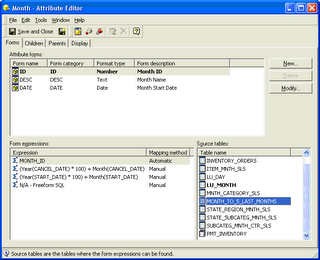
In addition the attribute form Month@ID should be extended automatically to the field MONTH_ID the new table:
Now we want to build a Metrik, which „a bit-map with 5 digits represents “to the form *****. Each asterisk corresponds thereby one month: the linkste asterisk refers to the month in the regarded report line, the next asterisk to the previous month (relative to the regarded report line), etc.
In place of each asterisk we want to indicate the indication „to X “, if the Abverkaufswert of the article were larger in the regarded report line in that asterisk position corresponding month 100. Otherwise we indicate in place of the asterisk the indication to O.
If thus for an article in the month the bit-map is indicated to 200804 „OXXOO , that means that this article had the Abverkaufswerte only in the months 200803 and 200802 more largely 100. According to the definition from setting of tasks such an article would not have large demand in the month 200804. “Only the combinations of the articles and months correspond to the large demand, for which the bit-map is calculated.
And here the definition of the Metriks is bit-map Sales > 100 in The load 5 Months:
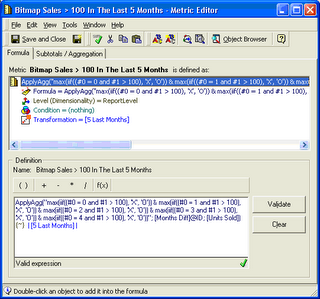
The dimensionality and Konditionalität of the Metrik are not changed. Only the transformation „5 load Months “is assigned the Metrik.
The formula of the Metrik looks as follows:
ApplyAgg(„max(iif((#0 = 0 and #1 > 100), ‘X’, ‘O’)) & max(iif((#0 = 1 and #1 > 100), ‘X’, ‘O’)) &max(iif((#0 = 2 and #1 > 100), ‘X’, ‘O’)) & max(iif((#0 = 3 and #1 > 100), ‘X’, ‘O’)) & max(iif((#0 = 4 and #1 > 100), ‘X’, ‘O’))“; [Months Diff]@ID; [Units Sold])
Because of the function ApplyAgg one must enter the logic in VisualBasic syntax (iif for the konditionale examination and & for the Konkatenierung). Probably it would function however also without ApplyAgg function, with the MicroStrategy functions IF and Concat. Logical way should generate however MicroStrategy in this case a very similar Query.
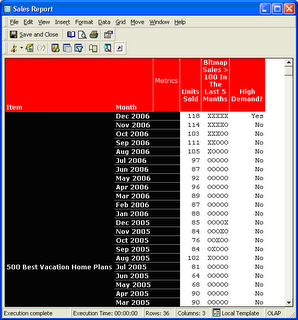
Here is screen SHOT of a report, which uses the Metric bit-map Sales > 100 in The load 5 Months :


The original article in German language can be read here.