Monthly Archives: July 2009

Triggering Narrowcast Jobs from Command Prompt

When I was a project manager, the developers that I worked with setup the Narrowcast jobs to kick off automatically once the ETL loads had completed.  Well, I recently had to figure out for myself how to do this, and after piecing all the technologies together and reading through a few MicroStrategy support notes, I felt it would probably be a good thing to document in this blog.   The below example was performed using a Windows NT Narrowcast server.

Well, triggering Narrowcast Services, first off can be done through MicroStrategy Command Manager. If it is not installed on your Narrowcast box, first go ahead and install the application there.

You will then need to log on to your Narrowcast Meta data from Command Manager in order to test your connection.   First off, your Narrowcast implementation and Command Manager install needs to be at the same support level, so I had to first upgrade my Narrowcast application.   Second, you have to setup a system DSN for your Narrowcast Metadata.  From there, you can log on to Narrowcast Metadata from Command Manager.  Here is some sample Command Manager code for kicking off a Service:

TRIGGER SERVICE “Service Name” IN FOLDER “Applications/My Applications/Services/”;

In Command Manager, I then save this code into a .scp file.  In order to kick off this Command Manager file, we then create a windows .bat with the following commands:

if not exist c:\cmdmgr\trigger.txt goto 20

cmdmgr.exe -w SQLServer -u user -p pass -d master -s dbo.PROD -f c:\cmdmgr\job.scp -o c:\cmdmgr\output.txt

del c:\cmdmgr\trigger.txt

goto end

:20

:end

This windows first checks for a trigger file (that will be supplied by the ETL team).  If the trigger file exists, then it kicks off the .scf script and then deletes the trigger file.    If the trigger file does not exist, then the .bat files does nothing.  Shown below is the command manager line explained further:
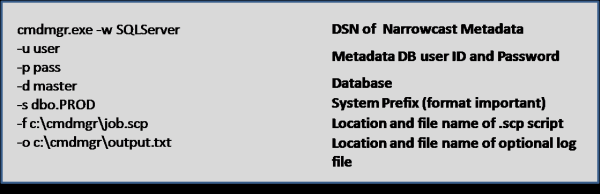
fig61

If you are having problems with the script, just test the cmdmgr.exe line in the .bat file.   You should be able to doubleclick the .bat and the service should run almost immediately.

Once you have all the above setup, it is just a matter of scheduling the .bat file to run every so often (15 minutes in our case).   I have yet to find a true trigger solution using Narrowcast.   I always have to setup a job which runs repeatedly until a flag is set, and then the job kicks off the actual report service.   Whether this flag is a database flag or a trigger file, the word ‘trigger’ is misleading because the report service is not really being triggered by the ETL load completion.  A easier solution for triggering Narrowcast jobs would be a very nice to have in one of Narrowcast’s later releases.

Just FYI, in order to schedule the .bat file to run every 15 minutes, I went into Settings->Control Panel->Scheduled Tasks, and just created a Scheduled Task using the wizard.   Click on the Advanced push button to select a schedule that is more frequent than just once a day.

This was not rocket science, but just thought it would be something nice to document.
Logical View columns have GUID :-D

My friend told showed me something that was kinda unbelievable. He had column REPORT_ID in 4 tables and had created 2 Logical views in MicroStrategy that also have a column named REPORT_ID. We he tried to create a new attribute based on this column REPORT_ID, MicroStrategy logical views were not getting listed as the source table 😕 . After much finding, I came to know that it is as per design. The example in the tech-note is about fact, but same issue also occurs for attributes.

If the column name is added manually via typing, it will have a different ID than the original column.

Wooof. Something never ever thought. I thought that column must be getting mapped, but no, there are GUIDs for each column too. If typed manually, there would be a new GUID created for the column in the Logical View. So, even if there are column with same names Logical View won’t get listed as Source table.

As per the tech-note: Select the desired column from the existing tables in the Warehouse Catalog, and drag it over to the Column Object.

Some nifty information about Logical Views:

  1. Logical views are embedded in the SQL as either derived tables (also known as in-line views) or common table expressions.
  2. A derived table is an independent SELECT statement that appears enclosed in parentheses in the FROM clause.
  3. Logical view produces a virtual table in the database.
  4. The column objects are matched to columns returned by the SQL statement by name, not by position. It matters only that the columns are defined and that the SQL statement provides an unambiguous name for each column. This is in contrast to a MicroStrategy Freeform SQL report, in which result columns coming back from the query are mapped onto report objects by position.The difference is that in a logical view, the mapping takes place entirely on the database, while in a Freeform SQL report, MicroStrategy has to interpret the dataset coming back from the database.
  5. The order of columns in a logical view definition cannot be changed permanently (A partial defect as the function is not as user would expect but this doesn’t add any issue in the SQL generated)

Stumbled upon this nice tech-note about Physical Modeling using Multi Source while finding information about Logical Views.

Data restriction using Security Filter

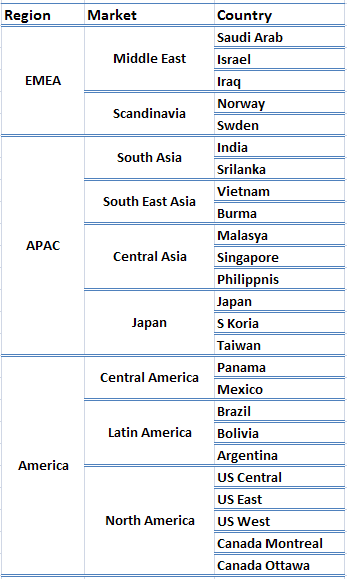
Take following scenario. You have three attributes. Region -> Market -> Country. (I know, spelling are pretty bad)

Geography Hierarchy

Geography Hierarchy

I had implemented Security Filter at Country level several time and explained to several friends about how to do it. But I never came across a scenario when I had to do it at Market level or Region level, i.e., not the lowest level of hierarchy.

Take a scenario, when you have put security filter for the User Group, who have been provided access to only South Asia Market runs a report containing Country attributes or someone with EMEA Region access runs a report with Market attribute. What would happen? Do you think that someone with South Asia Market would be able to see only India and/or Srilanka or someone restricted to APAC can’t see Middle East Market or Panama Country?

I know the half answer. There are so many possibilities. Hope to completely post by Month end.